vs ScreenCharm
Four times faster. And the features ScreenCharm skipped.
ScreenCharm takes 10 minutes to export a 10-minute recording, with no camera background removal, viewer analytics, or multi-track audio. ShipClip renders the same video in 2:33, adds all three, and runs on every Mac you own.
Founders price (first 100 buyers) · $79 after
10-min export
2:33
vs ScreenCharm's 10:40
Background removal
Built-in
Not in ScreenCharm
Price
$44 once
Founders price (first 100 buyers) · $79 after
01 · Benchmark · 1080p 60fps
2:33 vs 10:40.
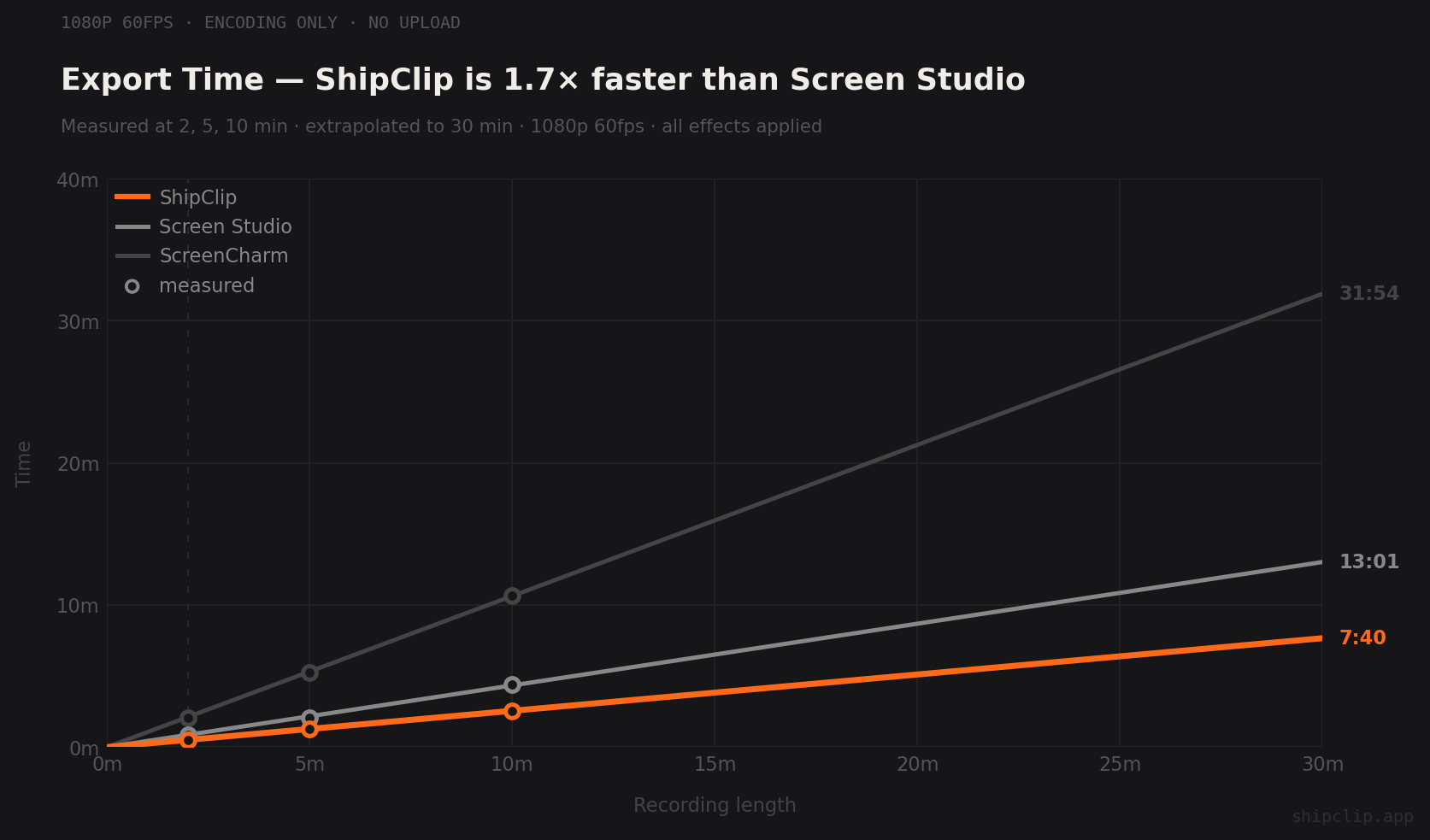
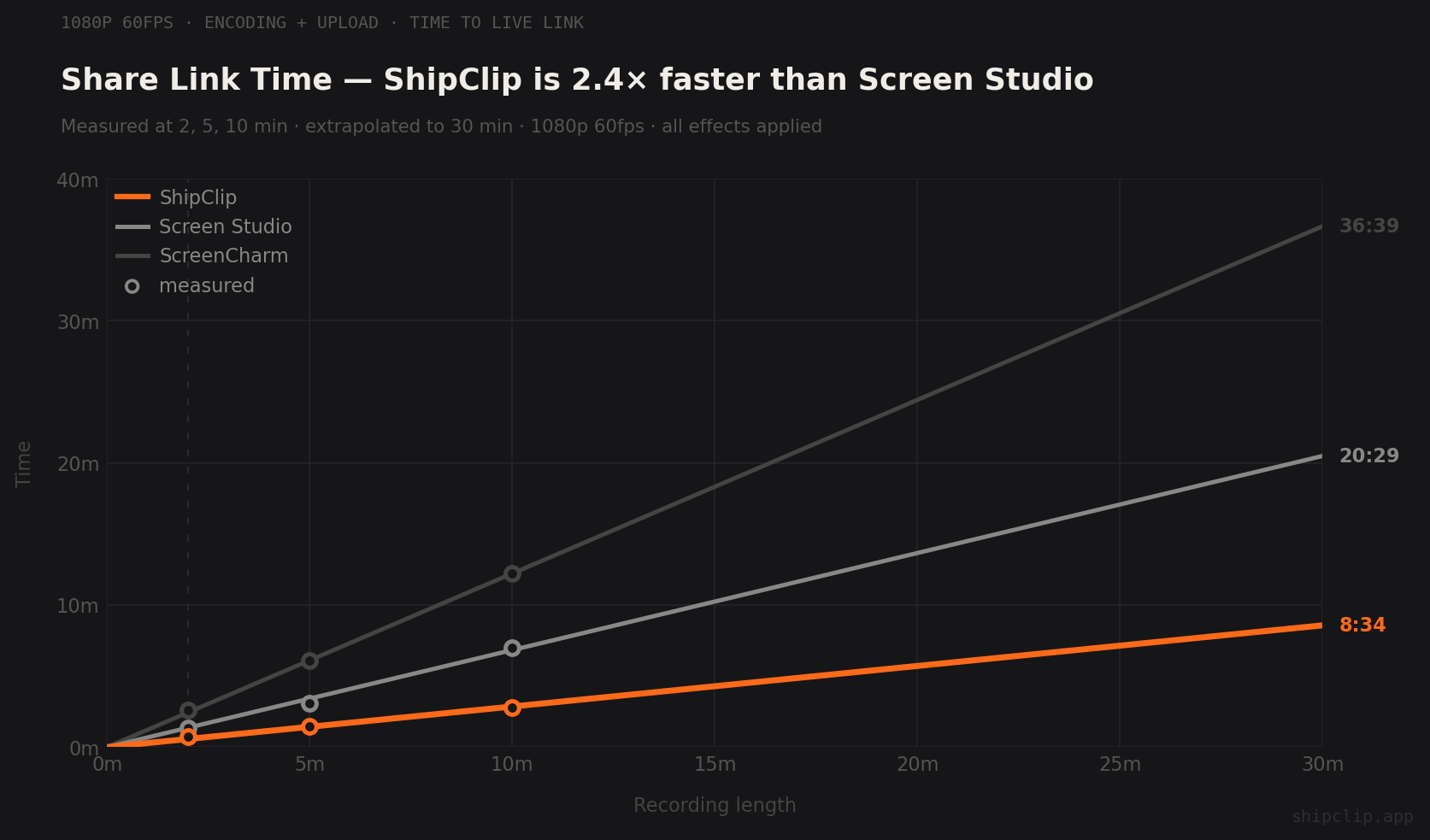
| Recording | ShipClip Export | ShipClip Share | ScreenCharm Export | ScreenCharm Share |
|---|---|---|---|---|
| 2 min | 0:31 | 0:45 | 2:05 | 2:35 |
| 5 min | 1:17 | 1:28 | 5:16 | 6:05 |
| 10 min | 2:33 | 2:48 | 10:40 | 12:12 |
ShipClip streams the upload during export, so the shareable link is live 15 seconds after render finishes.
02 · The analytics gap
Who watched? Who bailed?
You send a ScreenCharm link to five prospects. Two of them open it. One watches to the end. One drops off at 0:45. One never opens it at all. You have no idea which is which, so you follow up with everyone the same way.
ShipClip reports every view, every watch-through percentage, and every drop-off point. The prospect who watched to the end gets a call today. The one who bailed at 0:45 gets a different pitch. The no-show gets a nudge, not a full demo.
03 · Side-by-side
Feature comparison
| Feature | ShipClip | ScreenCharm |
|---|---|---|
| Recording | ||
| Camera background removal | Real-time, built-in | Not available |
| Multi-track recording | Screen + camera + mic + system, each editable | Single mixed track |
| Camera PiP | Drag anywhere, keyframe any position | Camera overlay |
| Editing | ||
| Annotations | Arrows, rectangles, text, blur fill | Not available |
| Animation easing | Custom bezier per zoom range | Not configurable |
| Screen styling | Custom backgrounds, padding, corners | Preset backgrounds + custom colors, padding, laptop frame |
| Sharing | ||
| Viewer analytics | Views, watch-through, drop-off | Not available |
| Shareable links | Yes, with hosting year 1 included | Yes, storage unspecified |
| Export speed | 10 min in 2:33, hardware-accelerated | 10 min in 10:40, near realtime |
| Cost & ownership | ||
| Devices | Unlimited | 3-device cap |
| Price | $44 one-time+ $39/yr Cloud, first year included | $79 one-time, cloud sharing included |
04 · The device cap
Every Mac, one license.
You have a laptop. You have a desktop. You pick up a second Mac for client work. That's 3. Add the old MacBook you still use for travel and ScreenCharm stops working. You pay $79 again for the same license you already bought.
ShipClip is one license per person. Your M2 Air. Your Mac mini. The loaner you used for a client week last fall. All of them, one payment.
Frequently asked
Yes. ShipClip removes or blurs the camera background in real time using Apple's Vision framework. No green screen, no virtual camera. ScreenCharm doesn't offer this.
ScreenCharm is $79 one-time, capped at 3 devices, with cloud sharing bundled. ShipClip's Founders License is $44 one-time with Cloud video hosting for year one. Install on every Mac you own. The moment you add a fourth Mac, ScreenCharm charges another $79. ShipClip doesn't.
ScreenCharm is a native Mac recorder with zoom effects, screen styling, a laptop frame, and cloud sharing. Pick it if 3 Macs is enough and you don't need multi-track audio, camera background removal, or viewer analytics. ShipClip adds all three plus unlimited devices and 4× faster exports.