Make videos worth watching.
Know if they did.
Auto-polished screen recordings, with the fastest exports on Mac. Share a link, see who watched, how long, and where they dropped off. Buy the app once. The cloud subscription is optional.
$44 one-time Founders License · Free year of Cloud, your gift to redeem
Founders price (first 100 buyers) · $79 after
v1.14.9· macOS 14+
Native Mac app. No dropped frames, no fan noise, no Electron.
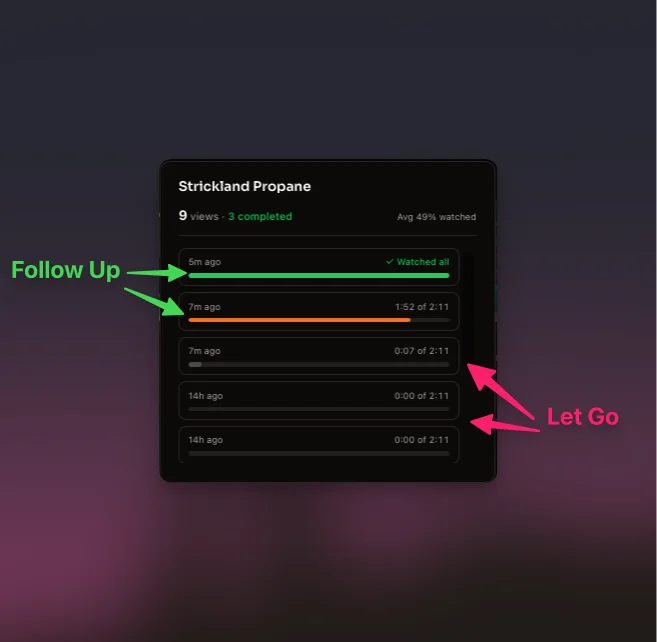
Stop Guessing Who's Interested.
The prospect who watched 80% is ready to buy. The one who bailed at 0:12 is gone. Skip the “just checking in.” Call the warm ones.
Look like you have a design team.
Amateur demos get closed in five seconds. Auto-zoom on every click, wallpaper backgrounds, cursor smoothing, bezier easing on every transition. Looks like a week of editing. Took none.
10 min recording · 1080p 60fps · Time to shareable link
M4 MacBook Pro
2.5x Faster Than Screen Studio
Record a 10-minute demo and share a link in 2:48. Built in Swift with Metal rendering. 6MB. Screen Studio is Chrome with a website stapled onto it.
Look like you record from a studio.
Your apartment isn't a studio. On-device background removal handles it, no green screen, no OBS, no virtual camera hacks. Don't want it gone? Blur it instead. Pick a frame: circle, rounded square, or full bleed. Drag the camera anywhere on the canvas and keyframe its position over time.
Stop shipping silent demos.
Silent demos feel cheap. Pick a click pack and a keystroke pack, and every keypress lands with the thwack of a mechanical keyboard. Viewers feel the moment a button gets pressed, the moment text commits, the moment a callout appears.
Annotations. Draw arrows, add text, or blur sensitive info after recording. Change colors, stroke weight, and duration. Accidentally showed a password? Blur it out instead of re-recording.
Keystroke Display. Show every keystroke on screen as you type. Customize sounds, size, color, and layout. Viewers follow along without you narrating every shortcut.
Auto Subtitles. Burn in subtitles word-by-word, generated on-device. Your viewer follows along silently at their desk, in a meeting, wherever.
Separate Audio Tracks. Mic, system audio, and camera each get their own track, with echo cancellation. A loud notification or clipped mic doesn't mean starting over.
Speed Controls. Speed up boring middles or slow down fast clicks. Global 0.25x to 4x with pitch-preserved voice, plus per-section speed ranges on the timeline. Trim 10 minutes off without cutting anything.
Cursor & Click Polish. Five click indicators (ring, ripple, spotlight, crosshair, filled) and cursor packs (default, Solarized Dark, Catppuccin Mocha). Pick a look. Match your brand or your mood.
Auto-Frame Face. Camera follows your face so you stay centered even when you lean back, scoot over, or stand up. Toggle on, talk like a person, look like you used a tripod.
Audio Automation. Volume keyframes on every track. Fade music under voiceover, duck system audio for a callout, automate the mix like you would in Logic. No re-recording for the perfect take.
How ShipClip compares
| Feature | ShipClip | Screen Studio | Loom | OBS |
|---|---|---|---|---|
| Export speed (10 min, 1080p) | 2:48 | 7:00 | Cloud-based | Instant (no effects) |
| Camera background removal | Remove + blur | Virtual backgrounds | Green screen only | |
| Share links (no viewer login) | ||||
| View analytics + drop-off | ||||
| Annotations (blur, arrows, text) | ||||
| Auto zoom on clicks | ||||
| Keystroke overlay | ||||
| Click + keystroke sound packs | Click only | |||
| Cursor packs | ||||
| Canvas backgrounds | ||||
| Pricing | $44 one-time | $29/mo | $18/mo | Free |
Export speed (10 min, 1080p)
Camera background removal
Share links (no viewer login)
View analytics + drop-off
Annotations (blur, arrows, text)
Auto zoom on clicks
Keystroke overlay
Click + keystroke sound packs
Cursor packs
Canvas backgrounds
Pricing
Export benchmarks on M4 MacBook Pro. Watch the full benchmark →
Founders pricing · first 100 buyers
Own it, forever
One purchase. The app is yours forever. Cloud comes as a free-year coupon you redeem whenever you're ready.
The App
One-time purchase
Founders License
- Yours to keep, forever
- Unlimited devices
- Unlimited local recordings & exports
- Works offline. No subscription required.
- 14-day refund guarantee
Admit One
Free year of Cloud
Send a polished demo, see who watched, see where they dropped off. Delivered as a coupon, redeem whenever. No expiry.
- Shareable links with viewer analytics
- Watch-through and drop-off tracking
- No card on file. No surprise charges.
Frequently Asked Questions
ShipClip is a one-time purchase: $44 for the Founders License (first 100 buyers) or $79 for the Lifetime License. The Mac app is yours forever. Record, edit, and export local MP4s with no Cloud needed. Both licenses include year 1 of ShipClip Cloud (video hosting + share links) free. After year 1, Cloud renews at $39/year, cancel anytime. The app keeps working either way. 14-day refund guarantee.
The Mac app is a one-time purchase — yours forever, every future update included. Only ShipClip Cloud (the hosting + share links) is recurring, because R2 storage and bandwidth cost money every month. If you cancel Cloud, your app keeps working; you just lose cloud-hosted share links (existing recordings archive, not delete, and come back if you re-subscribe).
The Mac app keeps working exactly the same: record, edit, and export local MP4s. Your License lasts forever. You can still download any of your previously uploaded videos from your account at any time. The only thing that stops is public share links (they show an "unavailable" message). Nothing is deleted, and re-subscribing instantly restores every share link.
Yes. ShipClip has built-in web sharing. Click Share, get a link. Your recording is viewable in the browser at shipclip.app. You can also export a local file and share it however you like.
ShipClip records your cursor position during capture and automatically generates zoom ranges around your clicks. Each zoom range has an adjustable scale, and you can edit, move, resize, or disable individual ranges in the timeline.
ShipClip has a 14-day, single-click refund on your License purchase. If you're not happy, click "Request a refund" on your account page within 14 days for a full refund — License removed, Cloud cancelled, no emails or questions.
Your next demo deserves better than a raw screen recording
6 MB download. Recording in under a minute.
Download ShipClipQuestions? ryan@shipclip.app