vs Screen Studio
Stop renting your screen recorder.
Screen Studio charges $29 every month until you stop paying. ShipClip is $44once, exports twice as fast, and adds background removal and viewer analytics Screen Studio can't match.
Founders price (first 100 buyers) · $79 after
Price
$44 once
vs $29/mo forever
10-min export
2:33
vs Screen Studio's 4:24
5-year cost
$200
vs $540 on annual plan
The subscription trap
Every year you stay on Screen Studio, you rent the app again. Skip a payment and your editing stops. Cancel and your share links die. You don't own anything, you rent access.
ShipClip is yours the moment you buy it. The License doesn't expire. Cloud is optional: cancel it and the desktop app still records, edits, and exports forever. Nothing you made gets held hostage to a renewal.
5-year cost
Screen Studio's annual plan is $108/year. ShipClip is $44 once, then $39/yr for Cloud hosting. Your first year of Cloud is included, and you can cancel it anytime without losing the app.
| Year 1 | Year 2 | Year 3 | Year 4 | Year 5 | |
|---|---|---|---|---|---|
| Screen Studio | $108 | $216 | $324 | $432 | $540 |
| ShipClip + Cloud | $44 | $83 | $122 | $161 | $200 |
$340 saved over 5 years. That's a new microphone, a Shure SM7B, and a camera light, with change left over. Or eight more years of Cloud.
Feature comparison
| Feature | ShipClip | Screen Studio |
|---|---|---|
| Recording | ||
| Camera background removal | Real-time, built-in | Not available |
| Multi-track recording | Screen + camera + mic + system, each editable | Mic + system audio separate |
| Keystroke display | On-screen with sound effects | Not available |
| Zoom-to-click | Auto-generated, animated, editable ranges | Auto-generated with animations |
| Camera PiP | Drag anywhere, keyframe any position | Fixed corner positions |
| Editing | ||
| Annotations | Arrows, rectangles, text, blur fill | Not available |
| Animation easing | Custom bezier per zoom range | Automatic, not configurable |
| Screen styling | Backgrounds, padding, corners | Backgrounds, padding, corners |
| Auto subtitles | Per-word highlighting | Per-word highlighting, plus chapters |
| Sharing | ||
| Viewer analytics | Views + watch-through + drop-off | Not available |
| Export speed | Metal + hardware encode (10 min in 2:33) | Electron + ffmpeg (10 min in 4:24) |
| Shareable links | Share a link, no viewer login | Shareable links included |
| Cost & ownership | ||
| Price | $44 one-time+ $39/yr Cloud, first year included | $29/mo or $108/yr, subscription only |
Export & share speed
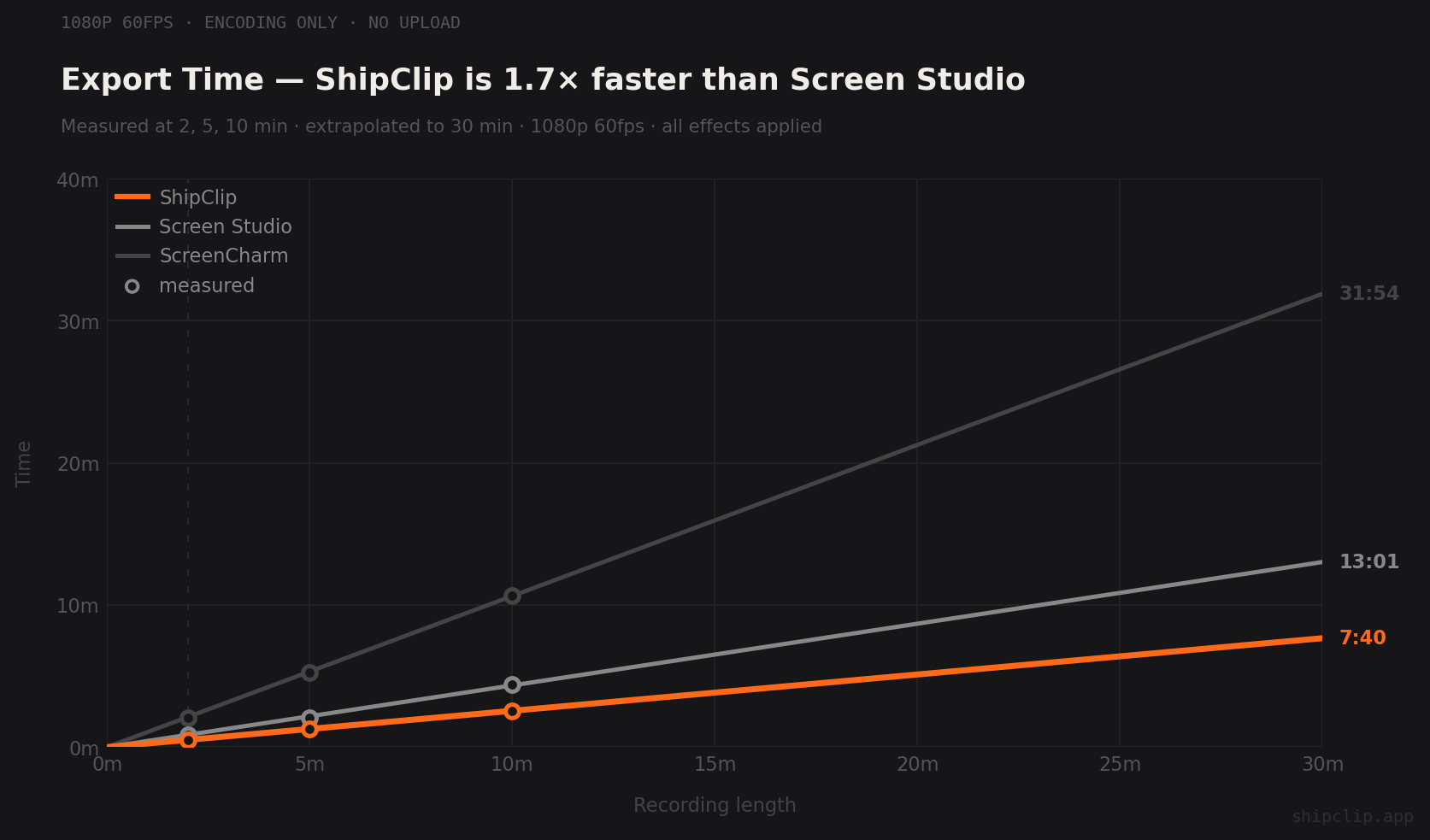
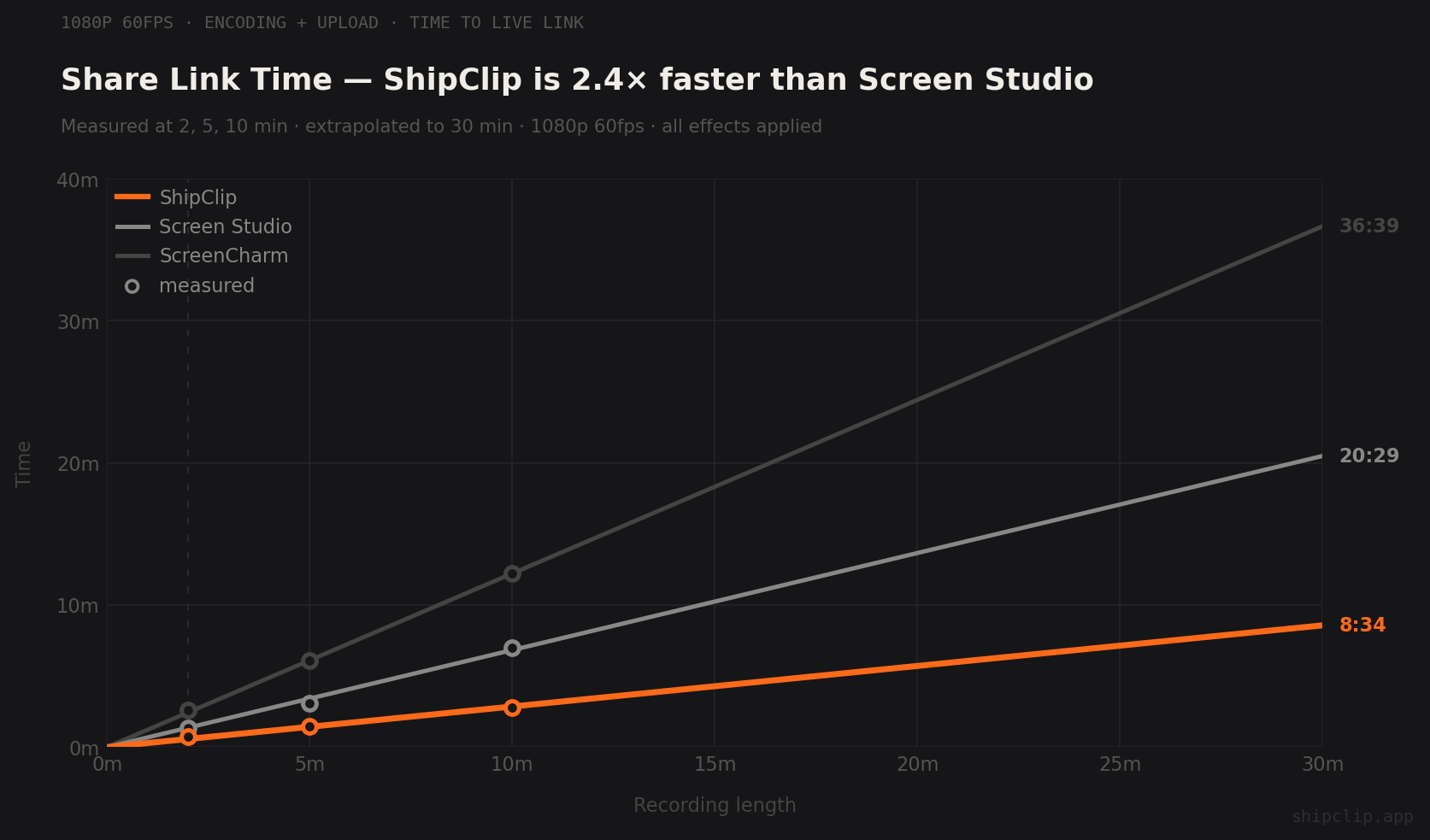
Benchmarks at 1080p 60fps with zoom-to-click, camera PiP, and screen styling on. Export is time to local file. Share is time to a live link. Watch the benchmark video.
| Recording | ShipClip Export | ShipClip Share | Screen Studio Export | Screen Studio Share |
|---|---|---|---|---|
| 2 min | 0:31 | 0:45 | 0:50 | 1:20 |
| 5 min | 1:17 | 1:28 | 2:04 | 3:05 |
| 10 min | 2:33 | 2:48 | 4:24 | 7:00 |
ShipClip exports ~2x faster and shares ~2.5x faster. The gap widens with longer recordings because ShipClip uploads during export instead of waiting for it to finish.
What Screen Studio doesn't do
Camera background removal
Record from your kitchen, a coffee shop, a messy desk. ShipClip removes or blurs the background in real time via Apple Vision. Screen Studio doesn't offer this at any tier.
Viewer analytics
Send a demo to 5 prospects. See which 2 watched past the halfway mark. Call them first. Screen Studio gives you a link and a shrug.
Multi-track audio with automation
Mic and system audio on separate tracks with volume keyframes. Dog barks mid-demo? Mute that section of the mic track. System audio stays untouched.
Twice the export speed
Metal GPU compositor + VideoToolbox hardware encoder. A 10-minute recording renders in 2:33, not 4:24. The shareable link is live in 2:48.
Frequently asked
Both cover the core: zoom-to-click, camera PiP, screen styling, multi-track audio, cloud sharing, and auto subtitles. ShipClip adds camera background removal, viewer analytics, custom easing per zoom range, and keystroke display with sound effects. ShipClip is $44 once; Screen Studio is $29 every month.
Screen Studio is $29/month or $9/month billed yearly ($108/year). They no longer offer a one-time license.
Yes. ShipClip auto-generates zoom ranges from your clicks, each with its own scale. Move, resize, retune, or disable individual ranges in the timeline. No manual keyframing.
Yes. At 1080p 60fps, ShipClip exports a 10-minute recording in 2:33 vs Screen Studio's 4:24. ShipClip streams uploads during export, so a shareable link is ready in 2:48 vs Screen Studio's 7:00. ShipClip uses Metal GPU compositing and hardware encoding. Screen Studio uses Electron and CPU ffmpeg.
Yes. ShipClip is the only screen recording tool with real-time camera background removal and blur at any price. It uses Apple's Vision framework for person segmentation during recording.
ShipClip is a one-time purchase: $44 Founders or $79 Lifetime, with Cloud video hosting for the first year included. Cloud renews at $39/year after. Over 5 years, that's about $200 total. Screen Studio is $29/month or $108/year: $540 over 5 years.
Need to save a Screen Studio shared video? Use our free Screen Studio Video Downloader. Paste a share link, get an MP4.
Own it for $44.
Or keep paying $29 every month.
Try ShipClip Free